Mobile Checkout Optimization: Why The Payment Step Loses More Shoppers On Phones
Watch someone try to buy running shoes on their phone while standing in line for coffee. They breeze through the product page, tap add to cart, maybe even get through shipping. Then the card form shows up and everything slows to a crawl.
That moment is what mobile checkout optimization is really about: the payment step, where a shopper who has already said yes runs into a tiny keyboard, a bank pop-up and a patchy connection, sometimes all at once.
The numbers back this up. Dynamic Yield’s benchmark data, as reported by Statista, shows US mobile shoppers abandoning carts at a rate roughly ten percentage points higher than desktop shoppers. Baymard Institute already puts the overall average near 70%, so phones start from a bad place and make it worse.
Sixteen Digits on a Six-Inch Screen
Start with the obvious one. Typing a card number on a phone is miserable.
On a laptop it takes ten seconds. On a phone you’re squinting at a 16-digit string while the keyboard covers half the form, and if the site serves the full letter keyboard instead of a number pad, you’re switching layouts just to type the expiry date. One typo and the field turns red.
Most of this is fixable with fairly boring front-end work (numeric input types, proper autocomplete tags so the browser can fill a saved card, expiry fields that don’t fight you over the slash). It’s the least glamorous kind of checkout optimization, and nobody wins an award for it, but it moves the number.
The Bank Pop-Up Nobody Planned For
Then comes authentication. A lot of card payments now trigger a 3D Secure check, where the bank wants proof it’s really you. On desktop that’s a quick code. On a phone it can mean leaving the browser, opening a text message or a banking app, copying a code and finding your way back.
Some shoppers return to a page that has reloaded. Or timed out. Or just sits there spinning with no explanation. I’d guess a fair share never return at all, and your analytics just logs a drop-off.
Good checkout optimization here means keeping that challenge inside the page wherever possible, leaning on frictionless 3DS2 flows when the issuing bank allows it, and making sure the cart survives a trip out to another app.
Wallets Are the Shortcut, If People Can Find Them
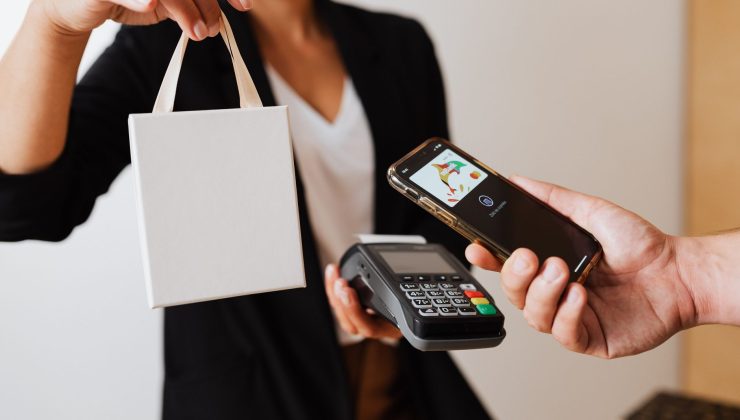
Apple Pay and Google Pay solve most of the typing problem in one tap. Face ID, done. No card number, no billing address form.
The catch is placement. Plenty of stores technically support wallets but tuck the button under the card form, below the fold, where a thumb-scrolling shopper never sees it. If most of your traffic comes from phones, that button belongs near the top of the payment step, not sitting at the bottom like an afterthought.
Saved, tokenized cards do something similar for repeat buyers. Card on file, one tap, gone.
When the Network Wobbles
Phones lose signal. Elevators, subway platforms, that one corner of the grocery store.
If someone taps pay and nothing visibly happens, they tap again. Then they worry about being charged twice and bail. Clear processing states help a lot here, and so does making sure a second tap can’t create a duplicate charge. On the backend, sending a failed payment to a backup provider instead of showing a flat error rescues orders that were never really lost to begin with.
This is the part of mobile checkout optimization that usually lives with engineering and payments teams rather than marketing, which is exactly why it gets overlooked.
What Breaks on Phones, and What Usually Fixes It
| Friction point | Why it hurts more on mobile | Common fix |
| Manual card entry | Small keyboard, wrong input type, easy typos | Numeric fields, autofill, card scanning |
| 3D Secure checks | App switching, page reloads, timeouts | In-page challenges, frictionless 3DS2 |
| Hidden wallets | Buttons pushed below the fold | Apple Pay and Google Pay near the top |
| Weak connections | Double taps, unclear payment status | Visible loading states, safe retries, backup routing |
| Trust signals | Less screen space to show them | Short security cues right beside the pay button |
Conclusion
If you only have one sprint, pull payment-step drop-off by device. If phones lose noticeably more people than laptops right at payment, that’s your answer, and it’s probably one of the issues above.
Fix the input fields first, since that’s cheap. Move the wallet buttons up. Then dig into what happens during authentication and failed payments, which takes longer but is usually where the bigger money sits. For fixes that go beyond mobile, this practical guide to checkout optimization covers the wider list.
None of this is exotic. Phone shoppers aren’t less willing to buy. They’re just more fragile at the exact second they pay, and treating checkout optimization for phones as its own problem, separate from desktop, is how you stop losing people who’d already made up their minds.